
My tmux AI integration
A small, color-coded tmux status bar for tracking OpenCode sessions
Herdr is the new kid in town. I tried it, but it’s just not my thing. It takes up too much of the terminal UI, and all I really want is a simple way to track my latest sessions.
So I made this.
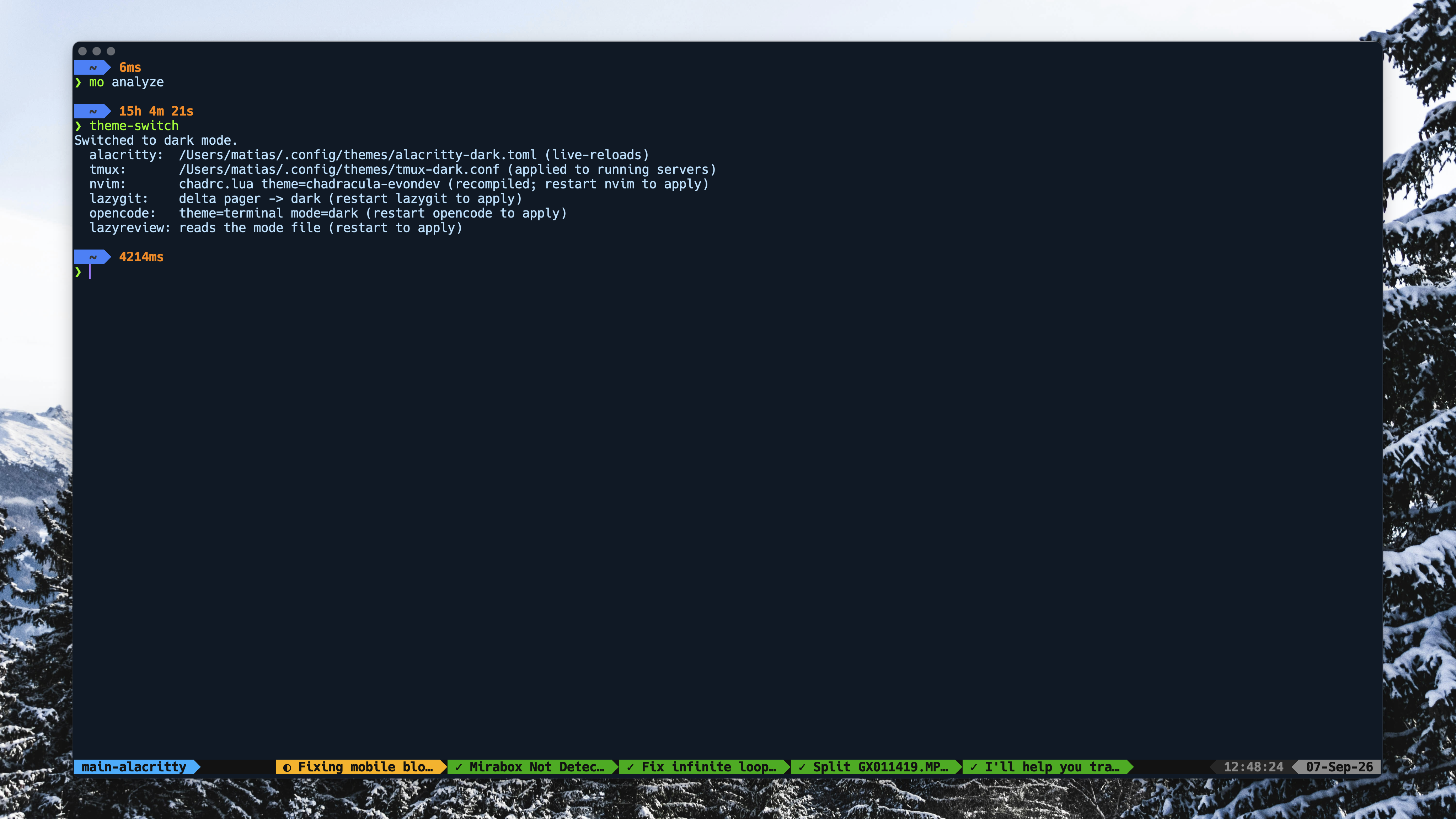
It’s a simple, color-coded tracker connected to OpenCode. OpenCode hooks update a local file. tmux watches for changes, and when it detects one, it re-renders the bar. That’s it.
The OpenCode side is a small plugin that subscribes to events and writes a JSON state file:
// ~/.config/opencode/plugins/tmux-status.js
export default {
  id: "tmux-status",
  async setup(ctx) {
    for await (const event of ctx.event.subscribe()) {
      const state = loadState();
      switch (event.type) {
        case "session.status":
          touch(state, event.data.sessionID,
            event.data.status?.type === "idle" ? "done" : "busy");
          break;
        case "permission.asked":
          addPending(state, event.data.sessionID, "permissions", event.data.id);
          break;
        // ...created, renamed, deleted, questions, etc.
      }
      saveState(state);       // ~/.local/share/opencode/tmux-status.json
      refreshTmuxClients();   // tmux refresh-client -S
    }
  },
};
On the tmux side, the status bar just calls a script that renders the state file as powerline segments:
# ~/.tmux/scripts/opencode-status.sh (excerpt)
if [ "$perms" -gt 0 ]; then   icon="!";  seg_bg="$BG_PERMISSION"
elif [ "$questions" -gt 0 ]; then icon="?"; seg_bg="$BG_QUESTION"
elif [ "$status" = "done" ]; then icon="✓"; seg_bg="$BG_DONE"
else                               icon="◐"; seg_bg="$BG_BUSY"
fi

output="${output}#[fg=${FG_MAIN},bg=${seg_bg},bold] ${icon} ${safe_title} #[fg=${seg_bg},bg=${BG_GREY}]${SEPARATOR}"
And it’s wired into the status bar with one line:
# themes/tmux-dark.conf
set -g status-format[0] "#[align=left] #S ... #[align=centre]#(bash ~/.tmux/scripts/opencode-status.sh)#[align=right] %H:%M:%S ..."
The titles come from OpenCode too, so I can see what each session is doing without opening another interface. The colors give me the status at a glance, and the whole thing stays in the status bar where it takes almost no screen space.
There isn’t much more to explain. It’s small, local, and does exactly what I wanted. Minimal screen use, and it works great for me.